The Complete GPU Guide for Gamers (2026): How to Choose the Right Graphics Card
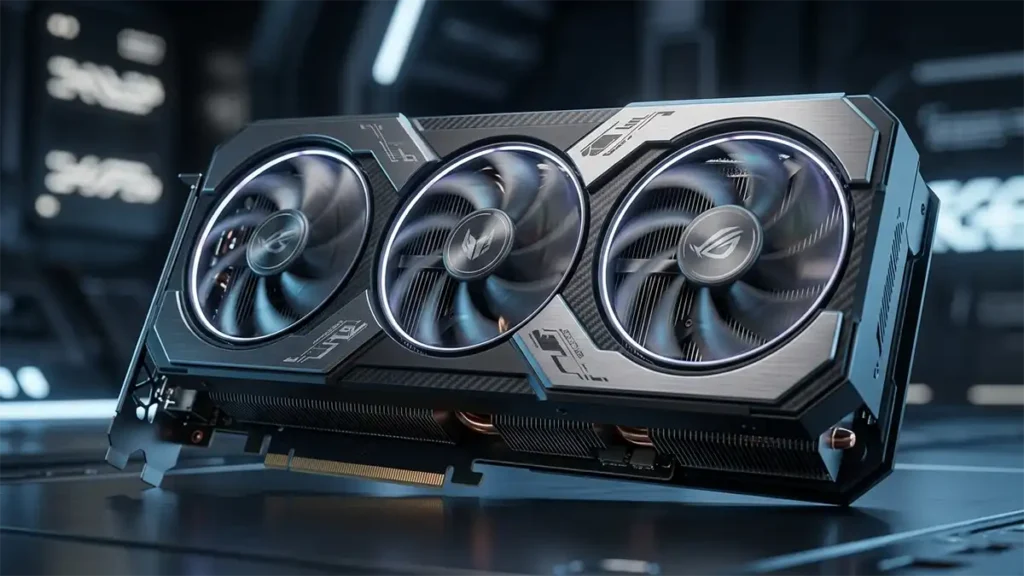
If you’re building or upgrading a gaming PC in 2026, this GPU guide will help you choose the right graphics card for your setup. The GPU is the single most important component you’ll buy.
Not the CPU. Not the RAM. The GPU.
But here’s where most buyers go wrong: they treat “best GPU” as a universal answer, when the right GPU is always specific to your monitor, your games, and the way you actually play. A card that’s perfect for a 4K cinematic gamer is a waste of money for someone running a 1080p esports rig and vice versa.
This guide cuts through the spec sheets and marketing noise. By the end, you’ll know exactly what to look for, what actually matters, and how to make a decision you won’t regret.
This guide is for you if:
- You’re building or upgrading a gaming PC in 2026
- You’re confused by specs like VRAM, DLSS, ray tracing, or frame generation
- You want to understand NVIDIA vs AMD vs Intel honestly
- You want to stop second-guessing your GPU choice
What Is a GPU, and What Does It Actually Do?
A GPU (Graphics Processing Unit) is the component responsible for rendering everything you see on screen. Every frame, every shadow, every texture, every reflection, that’s the GPU doing its job thousands of times per second.
It’s worth clarifying one thing that trips up a lot of beginners:
- GPU = the chip itself (e.g., NVIDIA’s AD102 or AMD’s Navi 48)
- Graphics card = the full product including the GPU chip, VRAM, power delivery, and cooling (e.g., an RTX 5080 or RX 9070 XT)
In everyday conversation, people use these interchangeably and that’s fine. But understanding the distinction helps when comparing specs across brands.
Integrated vs Discrete Graphics
| Type | What It Is | Gaming Use |
|---|---|---|
| Integrated | Built into the CPU (Intel UHD, AMD Radeon Graphics) | Light gaming or older titles only |
| Discrete | A dedicated graphics card with its own VRAM and cooling | Required for modern gaming |
If you’re serious about gaming, even casual AAA gaming at medium settings you need a discrete GPU. Integrated graphics are not a real alternative for anything released in the last few years.
Why the GPU Matters More Than the CPU for Gaming
This is one of the most common misunderstandings in PC building, and it leads to genuinely bad purchasing decisions.
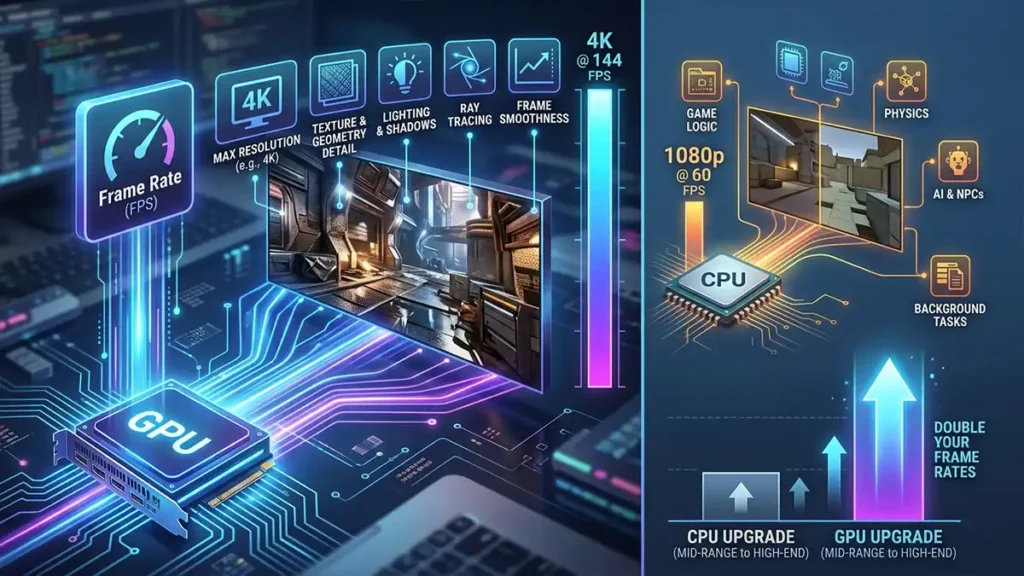
In most gaming workloads, the GPU is the primary bottleneck, not the CPU. The GPU determines your frame rate at a given resolution and quality setting. The CPU handles game logic, physics, AI, and background tasks, but for pure rendering performance, the GPU is doing the heavy lifting.
A practical example: upgrading from a mid-range CPU to a high-end CPU in a GPU-limited scenario might give you a 5–10% performance improvement. Upgrading the GPU in the same scenario could double your frame rates.
What your GPU directly controls:
- Frame rate (FPS) at your chosen resolution and settings
- Maximum resolution capability
- Texture and geometry quality
- Lighting effects, shadows, reflections
- Ray tracing and advanced visual effects
- Frame smoothness and consistency
The CPU still matters, it can create a bottleneck that limits GPU performance. but for most gamers, the GPU is where your budget has the highest impact.
Resolution, Refresh Rate, and Why They Define Your GPU Needs
Resolution Targets
| Resolution | Pixel Count | GPU Demand |
|---|---|---|
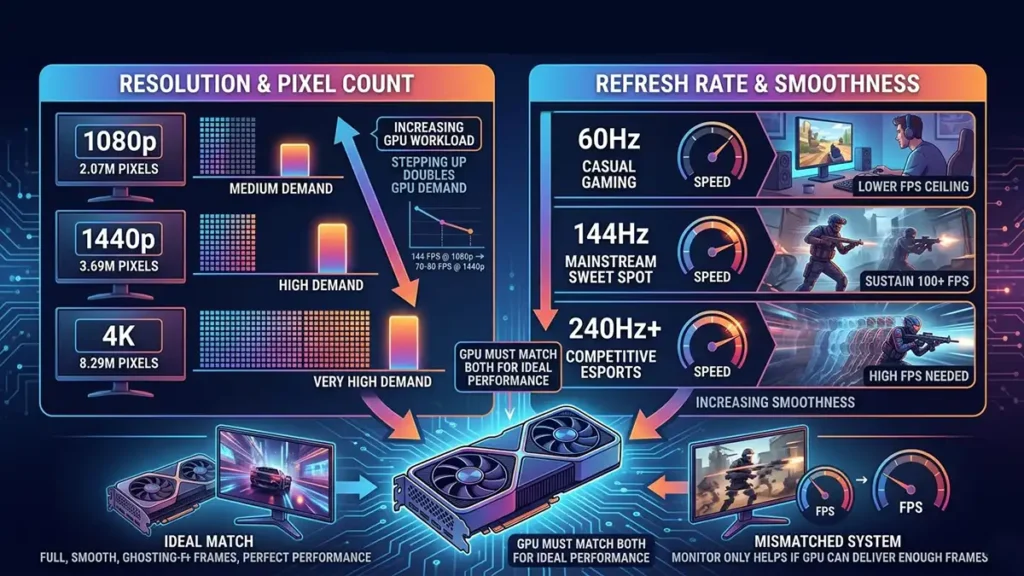
| 1080p (1920×1080) | 2.07 million pixels | Medium |
| 1440p (2560×1440) | 3.69 million pixels | High |
| 4K (3840×2160) | 8.29 million pixels | Very High |
Every time you step up in resolution, the GPU has to render roughly twice as many pixels. A card that runs 1080p at 144 FPS will often only hit 70–80 FPS at 1440p in the same game.
Refresh Rate Targets
| Refresh Rate | Use Case | GPU Implication |
|---|---|---|
| 60Hz | Casual gaming, consoles | Lower FPS ceiling needed |
| 144Hz | The mainstream sweet spot | GPU needs to sustain 100+ FPS consistently |
| 240Hz+ | Competitive esports | Demands high FPS, often at lower settings |
Higher refresh rates only help you if your GPU can deliver enough frames to fill them. A 240Hz monitor is useless if your GPU is pushing 90 FPS.
The Real Goal: Match Your GPU to Your Monitor
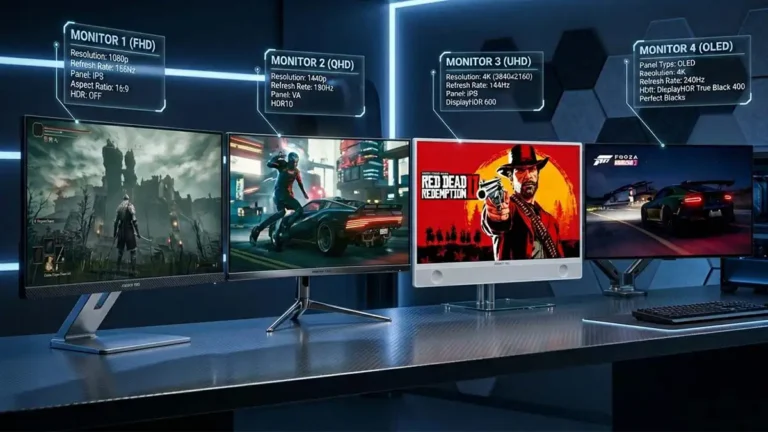
This is the most practical advice in this entire guide. Your GPU choice should be driven by your target resolution + refresh rate combination, not by a spec number or brand preference.
| Monitor Target | GPU Tier You Need |
|---|---|
| 1080p / 60Hz | Entry-level |
| 1080p / 144Hz | Low-to-mid range |
| 1440p / 144Hz | Mid-to-upper range |
| 1440p / 240Hz | Upper range |
| 4K / 60Hz | High-end |
| 4K / 120Hz+ | Flagship |
FPS vs Frame Time: The Distinction That Actually Matters
Most guides talk about FPS. Fewer talk about frame time and it matters just as much for how smooth your experience actually feels.
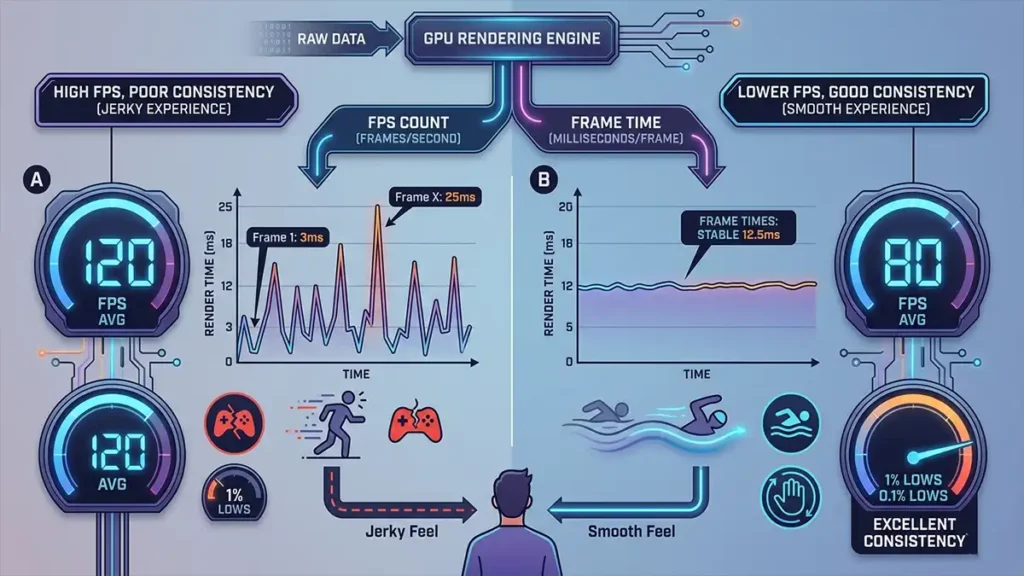
FPS (Frames Per Second) is a count. It tells you how many frames your GPU produced in a given second.
Frame time is how long each individual frame took to render, measured in milliseconds. It tells you how consistent those frames are.
Here’s why this matters: a GPU averaging 120 FPS sounds great, but if some frames take 3ms and others take 25ms, the game will feel jerky despite the high average. A stable 80 FPS with consistent 12.5ms frame times will feel noticeably smoother than 120 FPS with wildly varying frame times.
When reading benchmarks, look for 1% and 0.1% low FPS numbers in addition to averages these reveal frame time consistency under stress. A GPU with strong 1% lows is delivering a genuinely smooth experience. One with weak 1% lows will stutter regardless of its average.
Frame Time (Why Smoothness Isn’t Just FPS)
Think of FPS like how many photos your camera takes per second. Frame time is the spacing between those photos.
You could take 120 photos in one second, but if some are bunched together and others have gaps, the video looks choppy. Evenly spaced photos (consistent frame time) look smooth, even if there are fewer of them.
VRAM: How Much Do You Actually Need in 2026?
VRAM (Video RAM) is the GPU’s dedicated memory. It stores textures, game assets, shadow maps, frame buffers, and everything the GPU needs quick access to while rendering a frame.
Running out of VRAM doesn’t just reduce performance, it causes visible problems: texture pop-in, severe stuttering, and sudden FPS drops. These are among the most disruptive performance issues you can experience in gaming.
VRAM Requirements by Resolution (2026)
| Resolution | Minimum VRAM | Recommended VRAM |
|---|---|---|
| 1080p | 8GB | 10–12GB |
| 1440p | 12GB | 16GB |
| 4K | 16GB | 16–24GB |
These figures have shifted upward over the past few years. Games like Alan Wake 2, Hogwarts Legacy, and Indiana Jones and the Great Circle regularly push past 8GB at high settings even at 1080p. In 2026, buying a GPU with 8GB VRAM for 1440p gaming is a short-term compromise you’ll likely regret within 12–18 months.
VRAM (Why Running Out Feels So Bad)
Think of VRAM like your backpack while traveling. The game loads textures, models, and assets into that backpack.
If everything fits, you move smoothly. If it doesn’t, the system has to constantly swap things in and out from slower storage, like unpacking and repacking every few seconds, which causes stuttering and pop-in.
Memory Bandwidth: The Spec Nobody Talks About Enough
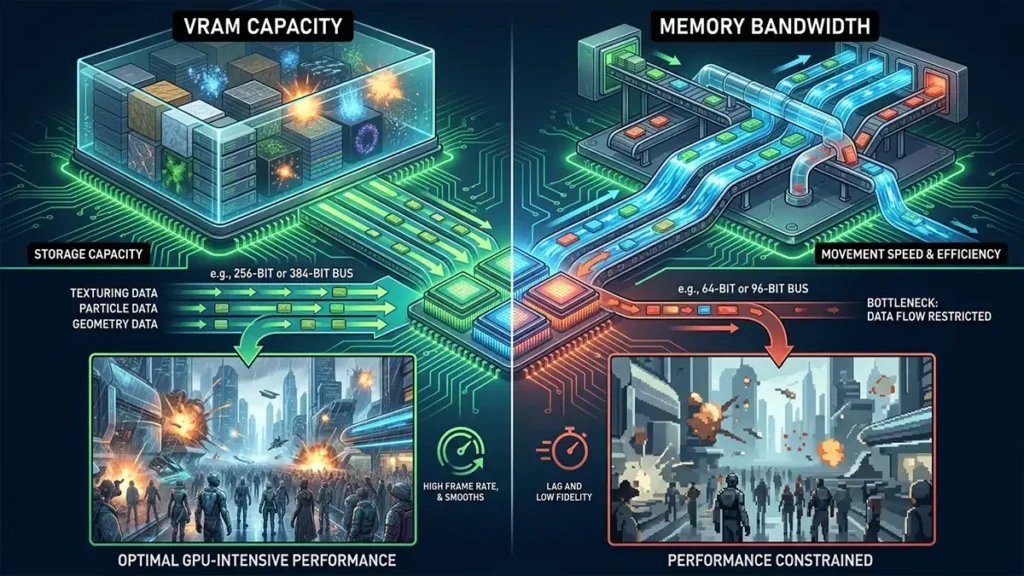
VRAM capacity tells you how much data the GPU can store. Memory bandwidth tells you how fast it can move that data.
Higher bandwidth means the GPU can feed its cores more efficiently, which matters most in GPU-intensive scenes, dense open worlds, particle effects, high-resolution textures. Two GPUs with the same VRAM capacity can perform very differently if one has significantly wider memory bus and higher bandwidth.
This is partly why some mid-range GPUs with wider memory buses outperform expectations, and why some budget cards with narrow 64-bit or 96-bit buses feel constrained even with adequate VRAM.
Memory Bandwidth (Why Speed Matters as Much as Size)
If VRAM is your storage space, memory bandwidth is the speed of the highway connecting it to the GPU.
A wide, fast highway (high bandwidth) lets data flow freely. A narrow road (low bandwidth) creates traffic, even if you have plenty of storage, the GPU can’t access it fast enough.
GPU Specs Explained: What to Look At (and What to Ignore)
GPU spec sheets are dense and can be genuinely misleading if you don’t know what you’re reading.
Specs That Matter
| Spec | What It Means | Why It Matters |
|---|---|---|
| Shader cores / CUDA cores / Stream processors | The raw processing units doing rendering work | More generally means more power, but varies by architecture |
| GPU clock speed (MHz/GHz) | How fast the GPU’s cores operate | Higher is faster, but architecture matters more than raw MHz |
| VRAM (GB) | Memory capacity | Sets the ceiling on texture detail and resolution |
| Memory bus width (bits) | How wide the memory channel is | Wider = more bandwidth, especially important at 4K |
| TDP / TBP (Watts) | Power draw under load | Determines PSU requirements and cooling needs |
| Memory type (GDDR6, GDDR6X, GDDR7) | Generation of memory technology | Newer = faster bandwidth per pin |
Specs That Are Often Overstated
- Boost clock speeds: These are peak speeds rarely sustained in real workloads. Real-world sustained clocks are more relevant.
- Raw core counts across brands: NVIDIA’s CUDA cores and AMD’s Stream Processors are architecturally different. You cannot compare them directly, a card with more “cores” isn’t necessarily faster.
- Marketing performance claims: Always verify with third-party benchmarks in the specific games you play.
The Technologies That Actually Change How Games Feel
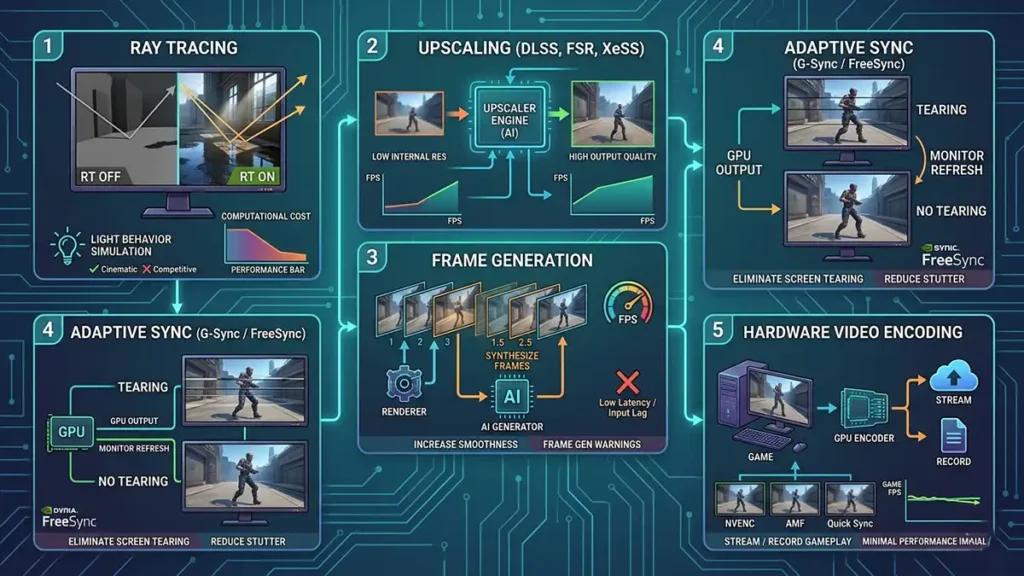
Modern GPUs are no longer just rendering engines. They include dedicated hardware for technologies that can dramatically change the performance-quality equation.
Ray Tracing
Ray tracing simulates how light behaves in the real world, how it bounces, refracts, and creates shadows and reflections. The results can look stunning, particularly in games built around it.
The honest reality: ray tracing is computationally expensive. Enabling it on a mid-range GPU in a demanding title will often cut your frame rate in half or more. It’s a feature best used alongside upscaling, or reserved for higher-end cards.
Is it worth it? For cinematic, single-player experiences where you want the best visuals and you have the GPU headroom, yes. For competitive gaming where every FPS counts, skip it.
Upscaling Technologies (DLSS, FSR, XeSS)
This is one of the most important technologies in modern gaming, and it’s often misunderstood.
Upscaling renders the game at a lower internal resolution, then reconstructs a higher-quality image using AI or spatial algorithms. Done well, it can be nearly indistinguishable from native rendering while delivering significantly better performance.
| Technology | Developer | GPU Requirement | Quality |
|---|---|---|---|
| DLSS 4 | NVIDIA | RTX series only | Excellent (AI-based, transformer model) |
| FSR 4 | AMD | Works on most GPUs | Very good (AMD RDNA 4 gets AI mode; others use spatial) |
| XeSS 2 | Intel | Works on most GPUs | Good, best on Intel Arc |
In 2026, DLSS 4 running on RTX 50 series cards with the new transformer model represents the current quality ceiling. FSR 4 has closed the gap significantly and benefits from being hardware-agnostic. If you’re buying an AMD or Intel card, FSR 4 spatial still provides genuine value.
Frame Generation
Frame generation uses AI to synthesize intermediate frames, effectively doubling or tripling your displayed frame rate without the GPU rendering every frame conventionally.
Where it works well:
- Single-player games where visual smoothness is the goal
- High-framerate scenarios where the base FPS is already solid (70+ FPS)
Where it doesn’t:
- Competitive gaming, because generated frames add latency that feels like input lag
- Very low base frame rates (below ~55 FPS), where artifacts become visible
Frame generation is a powerful tool for the right use case. It’s not a replacement for raw performance.
Adaptive Sync (G-Sync / FreeSync)
This is a monitor technology, but the GPU needs to support it. Adaptive sync synchronizes the GPU’s output frame rate with the monitor’s refresh rate, eliminating screen tearing and reducing stutter when FPS fluctuates.
- G-Sync: NVIDIA’s implementation, originally required certified hardware but now available in “G-Sync Compatible” mode on FreeSync monitors
- FreeSync / FreeSync Premium: AMD’s open standard, widely supported across both AMD and NVIDIA GPUs
This is a must-have feature combination for any serious gaming setup. The difference between gaming with and without adaptive sync on a mid-range GPU is immediately noticeable.
Hardware Video Encoding
If you stream or record gameplay, the GPU’s hardware encoder matters.
- NVIDIA NVENC: Consistently the best hardware encoder available. Produces high-quality streams with minimal performance impact.
- AMD AMF / HEVC: Has improved significantly but still trails NVENC in quality at equivalent bitrates.
- Intel Quick Sync: Excellent for recording and transcoding, particularly on Arc GPUs.
NVIDIA vs AMD vs Intel: The Honest 2026 Breakdown
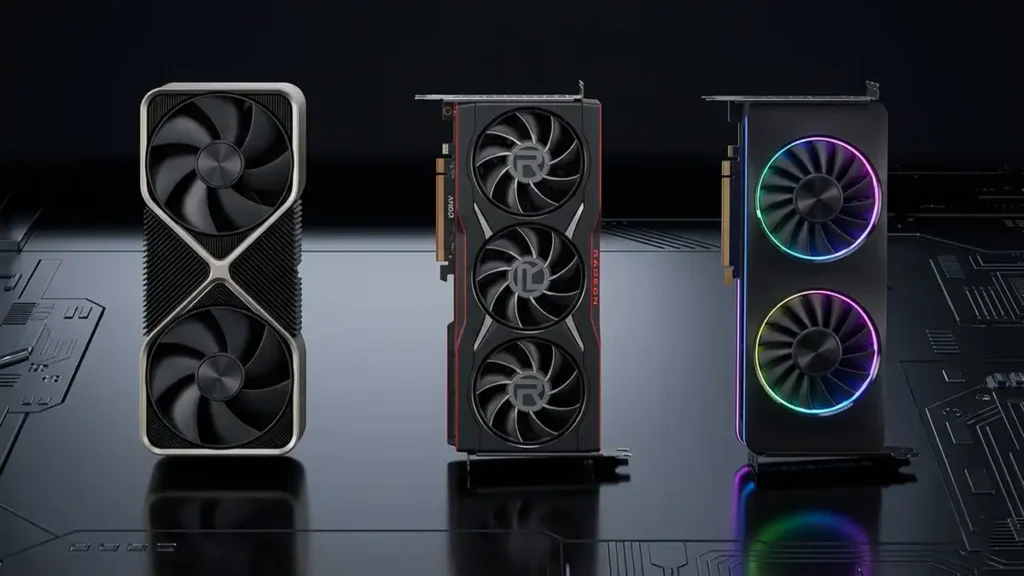
Brand choice generates strong opinions. Here’s a grounded look at where each sits in 2026.
NVIDIA — GeForce RTX 50 Series
NVIDIA’s RTX 50 series (Blackwell architecture) launched in late 2024 and into 2025, bringing substantial improvements in both raw performance and AI capabilities.
Where NVIDIA leads:
- Ray tracing performance (still the clear leader)
- DLSS 4 with transformer model upscaling, best quality available
- NVENC hardware encoding
- Flagship performance (RTX 5080, RTX 5090)
Where NVIDIA has room to improve:
- Value at mid-range tiers, AMD is more competitive here
- Availability at launch for high-demand cards
Best for: Enthusiasts who want the absolute best visual quality, content creators who rely on NVENC, and anyone who plays heavily ray-traced titles.
AMD — Radeon RX 9000 Series
AMD’s RDNA 4 architecture (RX 9000 series) has been a significant step forward, particularly at mid-to-upper mid-range price points.
Where AMD leads:
- Value per dollar, especially in the mid-range
- VRAM capacity at equivalent price points — AMD cards typically offer more VRAM
- Rasterization performance relative to cost
- FSR 4 AI upscaling on RDNA 4 hardware (competitive with DLSS in many scenarios)
Where AMD trails:
- Ray tracing performance (has improved but still behind NVIDIA)
- Software ecosystem and driver polish (improved but historically more variable)
- High-end flagship territory
Best for: Gamers who want the most GPU for their money, particularly at 1440p. Anyone who doesn’t prioritize ray tracing or NVENC encoding.
Intel — Arc B-Series (Battlemage)
Intel’s second-generation Arc GPUs (Battlemage, B580/B770) have been a genuine surprise. The B580 in particular landed as one of the best value mid-range cards available, and Intel has maintained strong driver support since the rough early days of the original Arc lineup.
Where Intel leads:
- Entry-to-mid-range value
- XeSS upscaling on Arc hardware
- AV1 hardware encoding (competitive with NVENC for this format)
Where Intel trails:
- High-end performance (no real flagship competitor)
- Ray tracing performance
- Mature software ecosystem compared to NVIDIA and AMD
Best for: Budget-conscious gamers at 1080p to light 1440p who want strong value and good encode capabilities.
Brand Comparison Summary
| Category | Winner | Notes |
|---|---|---|
| Raw flagship performance | NVIDIA | RTX 5090 leads by a clear margin |
| Mid-range value | AMD | RX 9070 / 9070 XT are exceptional at their price |
| Ray tracing | NVIDIA | Architecturally superior, especially with DLSS |
| Upscaling quality | NVIDIA (DLSS 4) | FSR 4 is close; XeSS is solid |
| VRAM per dollar | AMD | More VRAM at equivalent prices |
| Budget options | AMD / Intel | Both offer strong entry-level options |
| Content creation / streaming | NVIDIA | NVENC remains the encoder benchmark |
GPU Tiers by Gamer Type (2026)
This is the section most people need. Skip to your use case.
| Gamer Type | Resolution Target | GPU Tier | Notes |
|---|---|---|---|
| Esports / Competitive | 1080p / 240Hz+ | Entry to mid-range | High FPS matters more than visual quality |
| Casual AAA Gaming | 1080p / 60–144Hz | Mid-range | Solid experience without overspending |
| 1440p Sweet Spot | 1440p / 144–165Hz | Upper mid-range | Best value zone for most serious gamers |
| 1440p High-FPS | 1440p / 240Hz | High-end | Demanding; GPU needs headroom |
| 4K / 60Hz | 4K / 60Hz | High-end | DLSS/FSR essential to hit targets |
| 4K / 120Hz+ | 4K / 120Hz+ | Flagship | Budget of $700+ GPU-only |
| Creator + Gamer | Varies | High-end | Prioritize VRAM and NVENC if streaming |
| Modded Games | 1440p–4K | High VRAM | Modded Skyrim, BeamNG etc. eat VRAM |
How to Match Your GPU to the Rest of Your Build
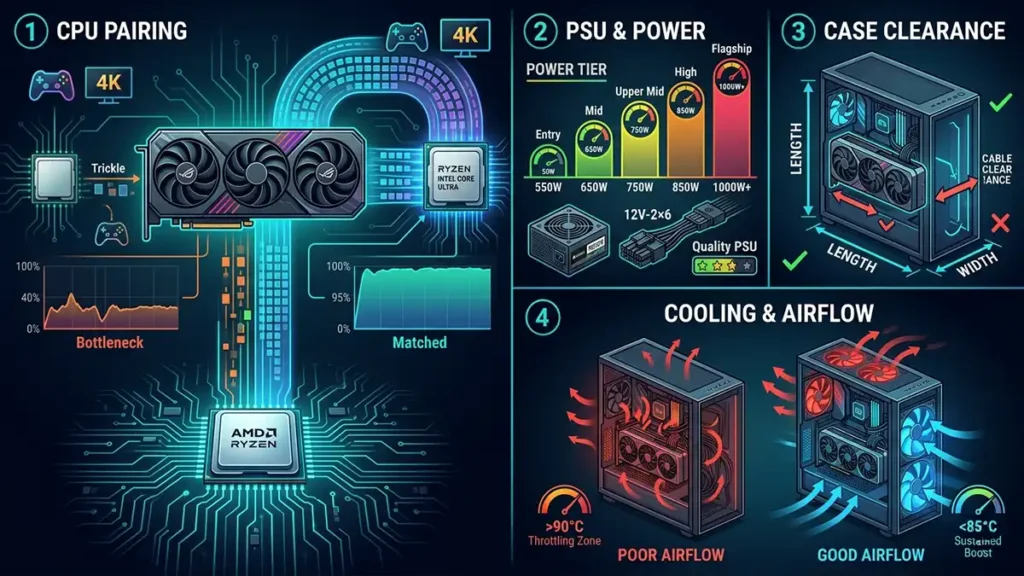
A GPU doesn’t operate in isolation. Getting the right card is only half the job, pairing it correctly with the rest of your system matters just as much.
CPU Pairing: Avoid Bottlenecks
A CPU bottleneck occurs when the CPU cannot feed the GPU with game data fast enough, limiting GPU utilization and capping frame rates below what the GPU is capable of.
Practical guidance:
- Pairing a flagship GPU (RTX 5080/5090, RX 9070 XT) with a budget 6-core CPU from several years ago will create a bottleneck, particularly in CPU-heavy games
- For 1080p esports titles, CPU choice matters more, games like CS2 are heavily CPU-dependent and can bottleneck even modest GPUs
- For 4K gaming, the GPU is almost always the limiting factor; CPU bottlenecks are rarer
You don’t need the best CPU on the market, but aim for a current-gen mid-range processor from AMD (Ryzen 7000/9000 series) or Intel (Core Ultra series) when pairing with a high-end GPU.
PSU: Size It Correctly
Modern high-end GPUs can draw significant power under load.
| GPU Tier | Typical GPU Power Draw | Minimum PSU Recommendation |
|---|---|---|
| Entry-level | 75–150W | 550W |
| Mid-range | 150–200W | 650W |
| Upper mid-range | 200–250W | 750W |
| High-end | 250–350W | 850W |
| Flagship | 350–600W+ | 1000W+ |
Always add headroom beyond these minimums. A high-end GPU in a system with a CPU, multiple drives, and fans needs more than just GPU TDP. Buy a quality PSU from a reputable brand (Seasonic, Corsair, be quiet!, ASUS), this is not where you cut corners.
The 12V-2×6 connector (ATX 3.0/3.1 spec) is now standard on high-end GPUs. Make sure your PSU supports it natively rather than through adapters if you’re buying flagship hardware.
Case Clearance
Modern GPUs are physically large. Triple-fan flagship cards can exceed 340mm in length and three PCIe slots in height. Before buying, check:
- Card length vs your case’s supported GPU length
- Slot width, some cards occupy 3.5 slots and can obstruct nearby PCIe slots or RAM clearance
- Power connector clearance, some cases are tight at the front where 12V-2×6 connectors sit
Cooling and Airflow
A GPU in a poorly ventilated case will throttle, the GPU’s protection mechanisms will reduce clock speeds to prevent overheating, directly cutting your performance. Good case airflow keeps GPU temperatures in a range where the card can sustain its boost clocks.
Aim for GPU temperatures below 85°C under sustained load. Most modern cards will throttle around 90–95°C. Good airflow, with intake fans at the front/bottom and exhaust at the rear/top, makes a measurable difference.
GPU Buying Tips and Common Mistakes
GPU Guide: FAQ ❓
Not necessarily. Esports titles are deliberately optimized to run at high frame rates on modest hardware. A mid-range card will comfortably hit 144–240+ FPS in CS2 or Valorant at 1080p. What matters more in these games is a fast CPU and low-latency monitor.
For single-player games where you have a solid base frame rate (70 FPS+), yes it makes the experience feel noticeably smoother. For competitive multiplayer, noو it adds latency that counteracts the benefit of a high frame rate.
NVIDIA if you want the best upscaling quality (DLSS 4), best ray tracing, or need NVENC for streaming. AMD if you want the most value at mid-range price points, more VRAM for the money, or don’t prioritize ray tracing. Both are genuinely excellentو your use case should decide, not brand loyalty.
Typically 3–5 years for a mid-range card at the resolution it was bought for, and potentially longer at lower resolutions or with upscaling enabled. Cards with more VRAM and wider memory buses tend to age better because they don’t hit memory constraints as quickly as games get more demanding.
GameMonkey Verdict
The right card for your setup
Choosing the right GPU in 2026 isn’t about buying the most powerful card, it’s about buying the right card for your setup.
Start with your monitor. Decide your target resolution and refresh rate. Then find the GPU tier that hits those targets consistently in the games you actually play, with enough VRAM to stay relevant for the next few years.
- NVIDIA for the best visual quality, ray tracing, and upscaling, if the budget is there
- AMD for the best value, especially at 1440p, the RX 9070 series is genuinely hard to beat per dollar
- Intel Arc for entry-level and budget 1080p gaming, the B580 remains a standout value option
The GPU market in 2026 is healthier and more competitive than it’s been in years. Whatever your budget, there’s a card that fits your needs, as long as you know what those needs actually are.