How to Choose a Gaming Keyboard: What Actually Matters (and What’s Just Marketing)
Buying a gaming keyboard today feels more complicated than it should be something any good gaming keyboard guide quickly makes clear.
Every product promises better performance through specs like optical switches, rapid trigger, 8,000Hz polling rates, aircraft-grade aluminum, and hot-swappable sockets. On paper, it sounds like upgrading your keyboard should instantly improve your aim, reaction time, and gameplay.
In reality, most modern gaming keyboards are already extremely capable. The difference between a good and great keyboard is rarely about raw specifications, it’s about feel, comfort, and how well the keyboard fits the way you play.
If you’ve already gone through a gaming mouse guide, you’ve probably noticed the same pattern. marketing focuses on specs, while real performance comes down to feel and fundamentals.
This guide breaks down what actually matters, what is mostly marketing, and how to choose the right keyboard based on real-world use rather than hype.
Quick Take: What Actually Matters in a Gaming Keyboard
If you ignore all the marketing, a gaming keyboard really comes down to a few key factors:
- Switch type affects feel, speed, and comfort
- Layout size impacts mouse space and ergonomics
- Build quality determines long-term experience
- Latency (to a point) matters, but has limits
What matters far less than brands suggest:
- ultra-high polling rates (4000Hz–8000Hz)
- extreme RGB customization
- “esports-grade” marketing labels
Focus on how the keyboard feels and fits your setup—not just the spec sheet.
The Switches: Where the Real Difference Begins
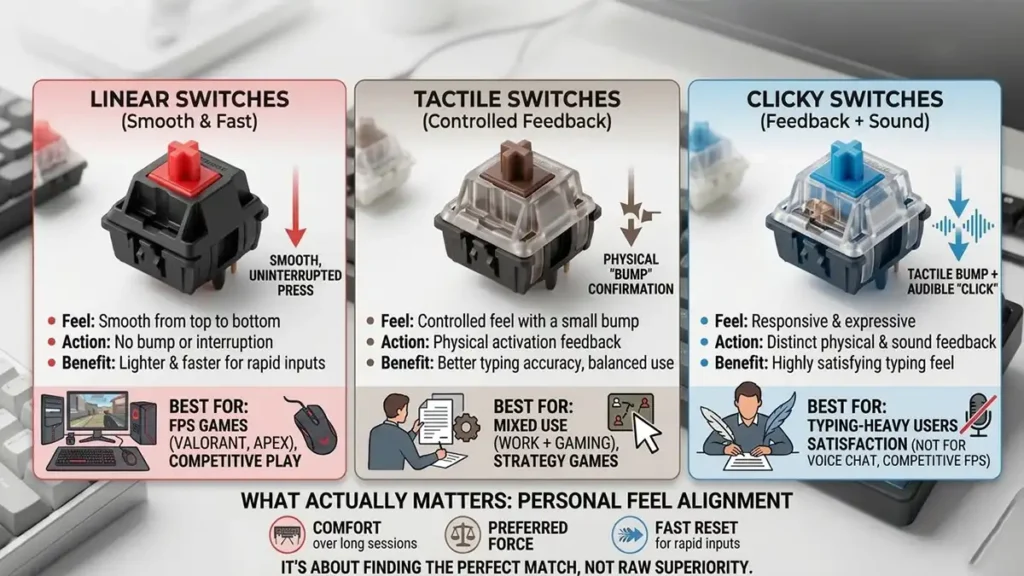
At the core of every keyboard are the switches. Everything else—RGB, aluminum frames, software—is secondary compared to how these feel.
A switch determines:
- how a key moves under your finger
- how much force is needed
- how fast input registers
- how the keyboard sounds
Even small changes here completely alter the typing and gaming experience.
Most switches fall into three main categories, each with its own personality.
Linear Switches (Smooth & Fast)
Linear switches are the simplest mechanically. The key moves straight down with no bump or interruption.
They feel:
- smooth from top to bottom
- consistent across every press
- often lighter and faster for repeated inputs
This is why they dominate competitive gaming setups.
Best for:
- FPS games (Valorant, CS2, Apex Legends)
- fast reaction inputs
- players who prioritize speed over feedback
If you’ve ever seen pro FPS players using “silent-feeling” keyboards, it’s usually linear switches.
Tactile Switches (Controlled Feedback)
Tactile switches introduce a small bump partway through the press.
Instead of relying purely on muscle memory, you get physical confirmation that the key has activated.
They are:
- more controlled than linear switches
- better for typing accuracy
- balanced between gaming and productivity
Best for:
- mixed use (work + gaming)
- strategy or slower-paced games
- users who want feedback on every press
Clicky Switches (Feedback + Sound)
Clicky switches combine a tactile bump with an audible click.
They feel:
- very responsive and expressive
- satisfying for typing-heavy users
- noticeably louder than other types
But in gaming environments, they often become a downside:
- distracting in voice chat
- less smooth for rapid inputs
- can feel “heavy” in fast action games
They’re more about typing enjoyment than competitive advantage.
What Actually Matters in Switches
Once you go beyond categories, the real deciding factors are surprisingly simple:
- how comfortable they feel over long sessions
- how much force your fingers prefer
- how quickly they reset for repeated presses
Everything else is secondary.
The biggest misconception is that “better switches = better performance.” In reality, it’s about personal feel alignment, not raw superiority.
Gaming Keyboard Switch Types at a Glance
| Type | Feel | Best For |
|---|---|---|
| Linear | Smooth, no bump | FPS, fast-paced games |
| Tactile | Noticeable bump | Mixed gaming + typing |
| Clicky | Bump + loud click | Typing-focused use |
Magnetic (Hall Effect) Switches: The New Category
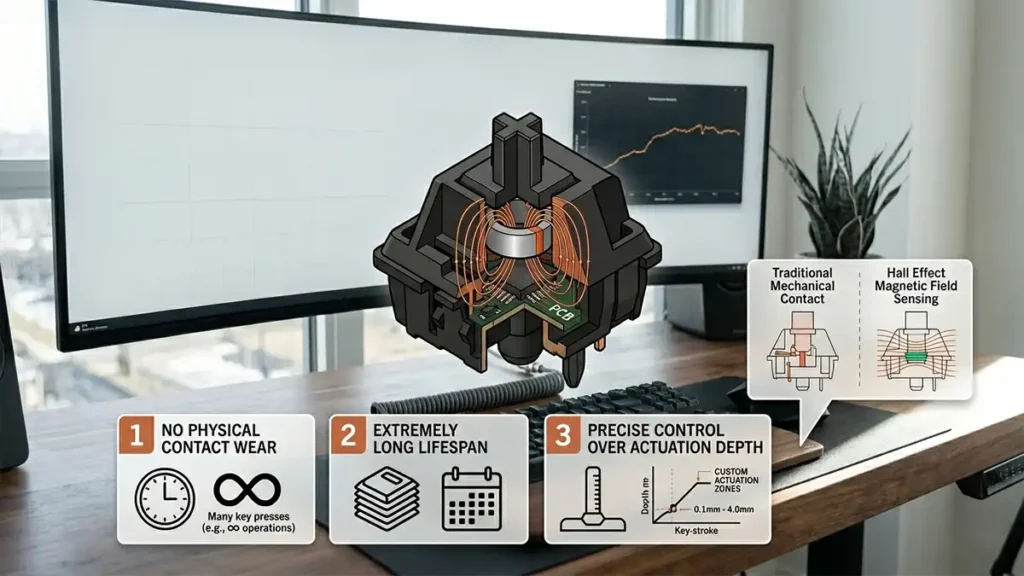
Traditional mechanical switches rely on physical contact points. Magnetic (Hall Effect) switches remove that entirely. Instead of metal touching metal, they use magnets and sensors to detect key position in real time.
That leads to three important differences:
- no physical contact wear
- extremely long lifespan
- precise control over actuation depth
This last point is what changed everything.
Actuation & Rapid Trigger: Real Innovation, Not Just Marketing
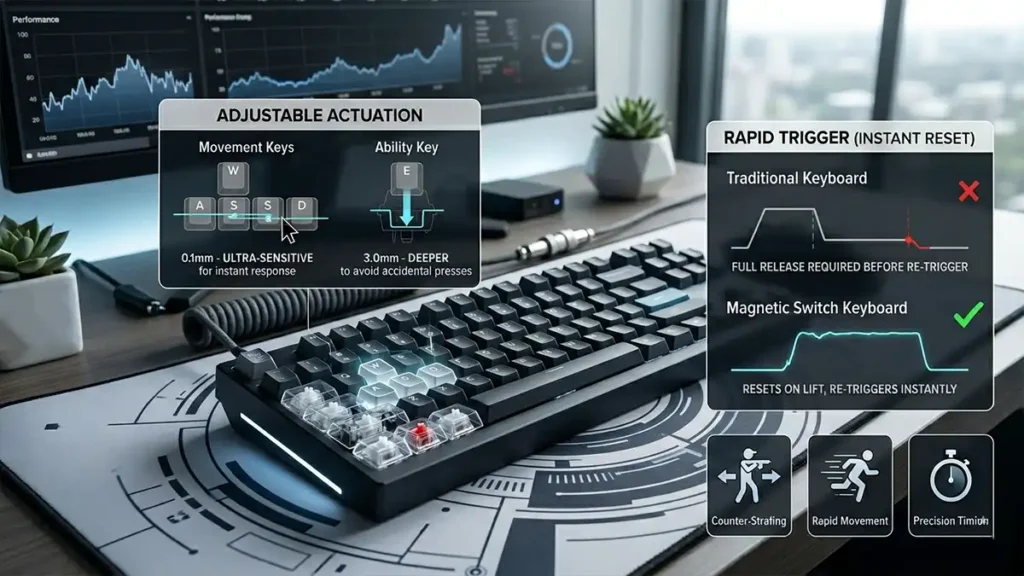
This is where modern keyboards start to introduce genuinely new behavior.
Adjustable Actuation (Real Control Over Sensitivity)
The actuation point is how far a key needs to be pressed before it registers.
Traditional switches:
- fixed at ~2.0mm
- cannot be changed
Magnetic switches:
- fully adjustable per key
- can go extremely shallow or deep
In practice, this means you can fine-tune your keyboard like this:
- movement keys → ultra-sensitive for instant response
- ability keys → deeper to avoid accidental presses
It’s one of the first times keyboards become customizable at the physical input level.
Rapid Trigger (Instant Reset System)
On a normal keyboard, a key must return to a fixed reset point before it can trigger again.
Rapid Trigger removes that limitation completely.
Instead:
- the key resets the moment you lift your finger
- it re-triggers instantly when pressed again
This creates a noticeable difference in specific gameplay situations.
Where it actually matters:
- counter-strafing in FPS games
- rapid directional movement
- precision timing in competitive shooters
Where it doesn’t matter much:
- casual gaming
- single-player games
- general productivity use
It’s powerful, but situational—not universally important.
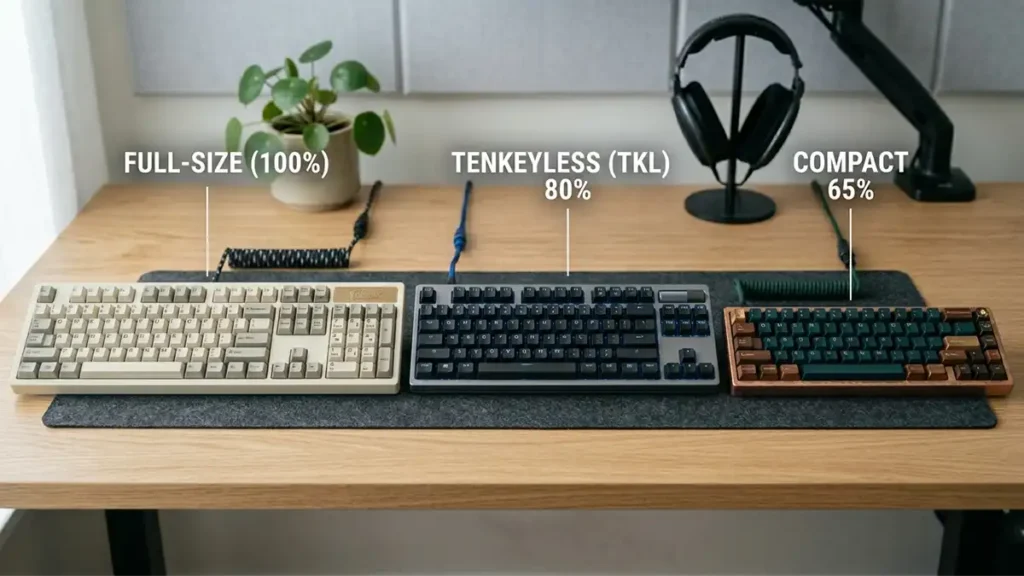
Keyboard Layouts: Size Affects Performance More Than People Think
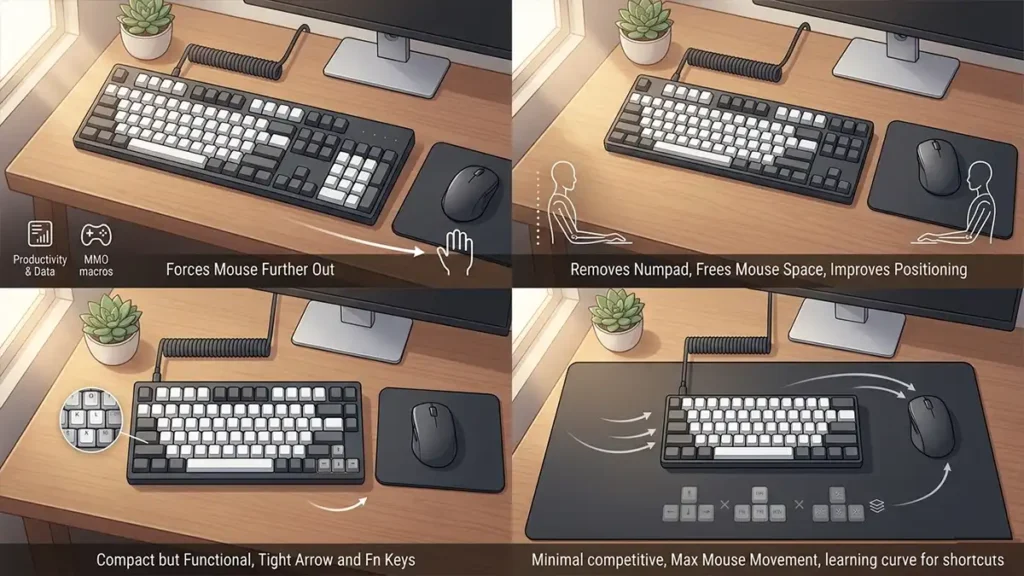
Most people underestimate how much keyboard size affects gameplay comfort. It’s not just about aesthetics—it changes posture and mouse movement.
Choosing the right layout comes down to how you balance space and usability. Smaller keyboards give you more room for mouse movement, which is especially important for low-sensitivity FPS players. Larger layouts, on the other hand, prioritize convenience and functionality, making them better for productivity or complex keybind-heavy games.
Full-Size Keyboards (100%)
These include everything: numpad, function row, navigation cluster.
They are:
- great for productivity
- useful for MMO macros and data input
- but physically large on a desk
Downside is simple:
- forces your mouse hand farther away
- can reduce ergonomic comfort in gaming sessions
Tenkeyless (TKL)
This is the most balanced layout for gaming.
By removing the numpad, it:
- frees up mouse space
- improves arm positioning
- keeps all essential keys
This is why it’s often considered the “default gamer layout.”
75% Layout
A compact version that still keeps arrow keys and function row.
It feels:
- tight and efficient
- very popular in enthusiast keyboards
- slightly more compressed than TKL
60% / 65% Layouts
Minimalist layouts focused entirely on space efficiency.
You gain:
- maximum mouse movement space
- extremely compact setup
But you lose:
- dedicated arrow keys
- function row
- navigation cluster
Which means:
- more reliance on shortcuts and layers
- learning curve for productivity use
Keyboard Layout Comparison
| Layout | What You Get | Advantages | Downsides | Best For |
|---|---|---|---|---|
| Full-Size (100%) | All keys (numpad, function row, navigation) | Full functionality, great for productivity and MMOs | Large footprint, less mouse space, wider arm position | Work + gaming, MMO players |
| Tenkeyless (TKL) | No numpad | Better ergonomics, more mouse space, balanced layout | Slightly less functionality than full-size | Most gamers (FPS + general use) |
| 75% Layout | Compact with function row + arrows | Saves space while keeping key features | Tighter layout, can feel cramped | Gamers who want compact + functionality |
| 60% / 65% | Minimal keys (no F-row, limited nav keys) | Maximum mouse space, very compact | Requires shortcuts, learning curve | Competitive FPS, minimalist setups |
- Full-size → everything, but bulky
- TKL → balanced standard
- 75% → compact but functional
- 60% → minimal, competitive-focused
Build Quality: The Part That Actually Ages Your Keyboard
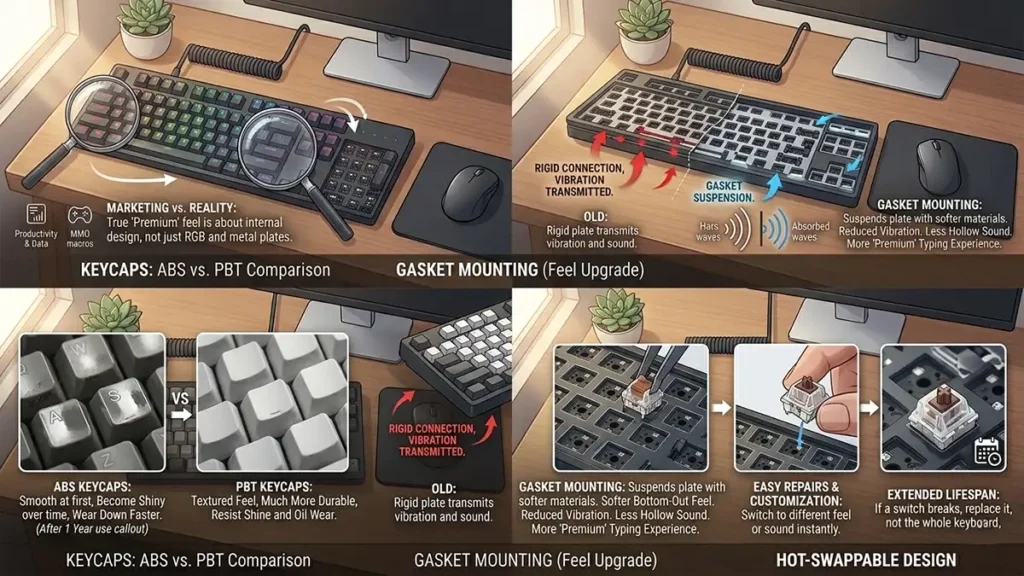
This is where marketing often misleads buyers the most. A keyboard’s “premium feel” isn’t about RGB or metal plates—it’s about materials and internal design.
Keycaps: ABS vs PBT
This is one of the biggest long-term differences.
ABS keycaps:
- smooth at first
- become shiny over time
- wear down faster
PBT keycaps:
- textured feel
- much more durable
- resist shine and oil wear
If you care about long-term feel, PBT matters more than almost any external feature.
Gasket Mounting (Feel Upgrade, Not Spec Sheet Feature)
Instead of rigidly mounting the internal plate, gasket-mounted keyboards suspend it using softer materials.
What you get is:
- softer bottom-out feel
- reduced vibration
- less hollow sound
- more “premium” typing experience
This is one of those upgrades you don’t understand until you try it.
Hot-Swappable Design
Hot-swap keyboards allow switches to be replaced without soldering.
That means:
- easy repairs
- long-term customization
- extended lifespan
If a switch breaks, you don’t replace the keyboard—you just replace the switch.
Keyboard Build Quality: What Actually Matters
| Feature | What It Affects | Why It Matters |
|---|---|---|
| Keycaps (PBT vs ABS) | Feel + durability | Determines long-term wear and texture |
| Gasket Mounting | Typing comfort + sound | Reduces harshness and improves feel |
| Hot-Swap Support | Longevity + flexibility | Allows easy repairs and customization |
Polling Rate: Where Marketing Overreaches
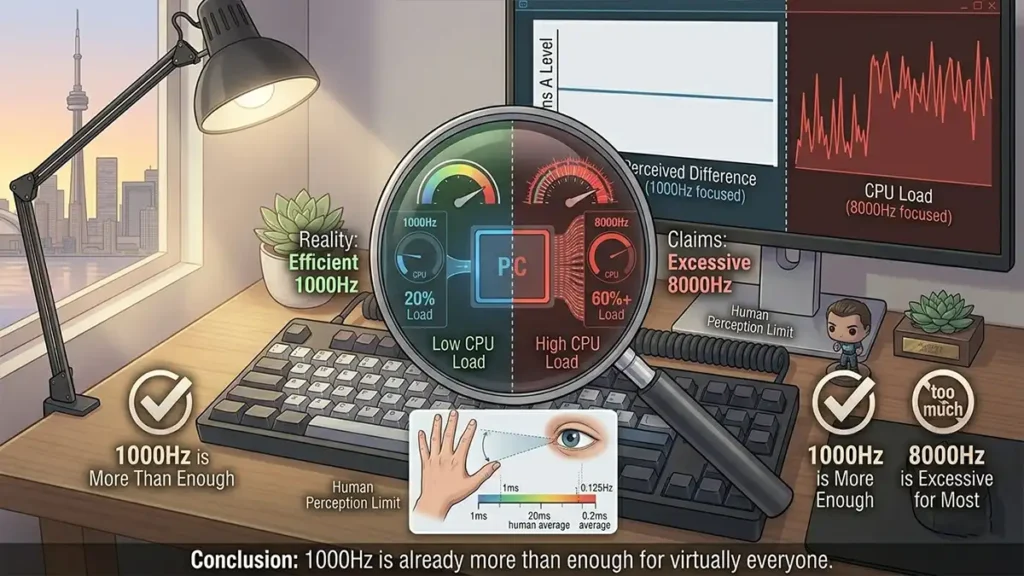
Polling rate is how often the keyboard reports input to your PC.
- 1000Hz = 1ms response time
- 8000Hz = 0.125ms response time
On paper, that sounds like a massive improvement. In reality, it isn’t.
The difference is below human perception in most cases, often irrelevant in real gameplay, and can sometimes even add unnecessary system load. In practice, 1000Hz is already more than enough for virtually everyone.
Wireless vs Wired: The Performance Gap Is Gone
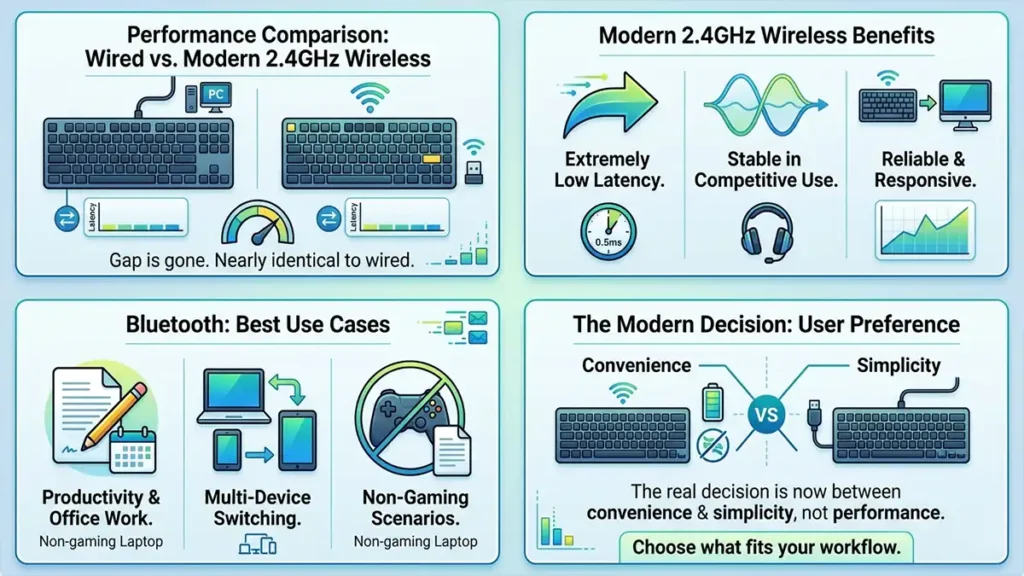
Wireless keyboards used to be a compromise, with noticeable latency and reliability issues. That’s no longer the case.
Modern 2.4GHz wireless keyboards perform nearly identically to wired connections, offering extremely low latency and stable performance even in competitive scenarios. For most gamers, the difference is effectively impossible to notice in real-world use.
Bluetooth, however, is a different story. While convenient for productivity and multi-device switching, it still introduces more latency than 2.4GHz connections, making it less ideal for fast-paced gaming.
Quick comparison:
- 2.4GHz wireless: gaming-grade performance, low latency, stable
- Bluetooth: convenient, but higher latency
- Wired: simple, reliable, no charging required
In practice, the decision is no longer about performance, it comes down to preference. Wireless offers a cleaner setup and flexibility, while wired remains straightforward and maintenance-free.
How to Choose the Right Gaming Keyboard by Player Type
Different games prioritize different features, so your keyboard choice should reflect that.
| Feature | FPS | MMO | Casual | Work + Gaming |
|---|---|---|---|---|
| Switch Type | Linear / Magnetic | Tactile | Any | Tactile |
| Rapid Trigger | High value | Low | None | None |
| Layout | 60% / TKL | Full / TKL | 75% | TKL / Full |
| Build Quality | High | High | Medium | High |
| Wireless | Optional | Optional | Optional | Preferred |
Gaming Keyboard : FAQ ❓
There is no single best keyboard, but TKL and 65% layouts with linear switches are the most versatile for most gamers.
Not directly. They improve feel and consistency, which can help but skill matters far more.
They offer advanced features and durability, but they are not required for a great experience.
Yes, if it uses 2.4GHz. Bluetooth is still slower.
GameMonkey Verdict
Ignore the marketing and focus on fundamentals
This gaming keyboard guide is not about chasing specs, it’s about understanding what actually improves your experience. The best gaming keyboard is not the one with the most specs or the most aggressive marketing.
It’s the one that:
- feels natural under your fingers
- matches your game style
- supports your posture and setup
- doesn’t distract you while using it
Modern keyboards are already good enough that most “upgrades” are refinements, not revolutions.
If you focus on fundamentals, switch feel, layout, build quality, and comfort; you’ll end up with a keyboard that improves your experience in a real, consistent way rather than a theoretical one.